Submitting Content for Certification
Content Certification accepts documents in multiple formats through both dashboard and API. This guide covers submission methods, supported formats, and size limits.
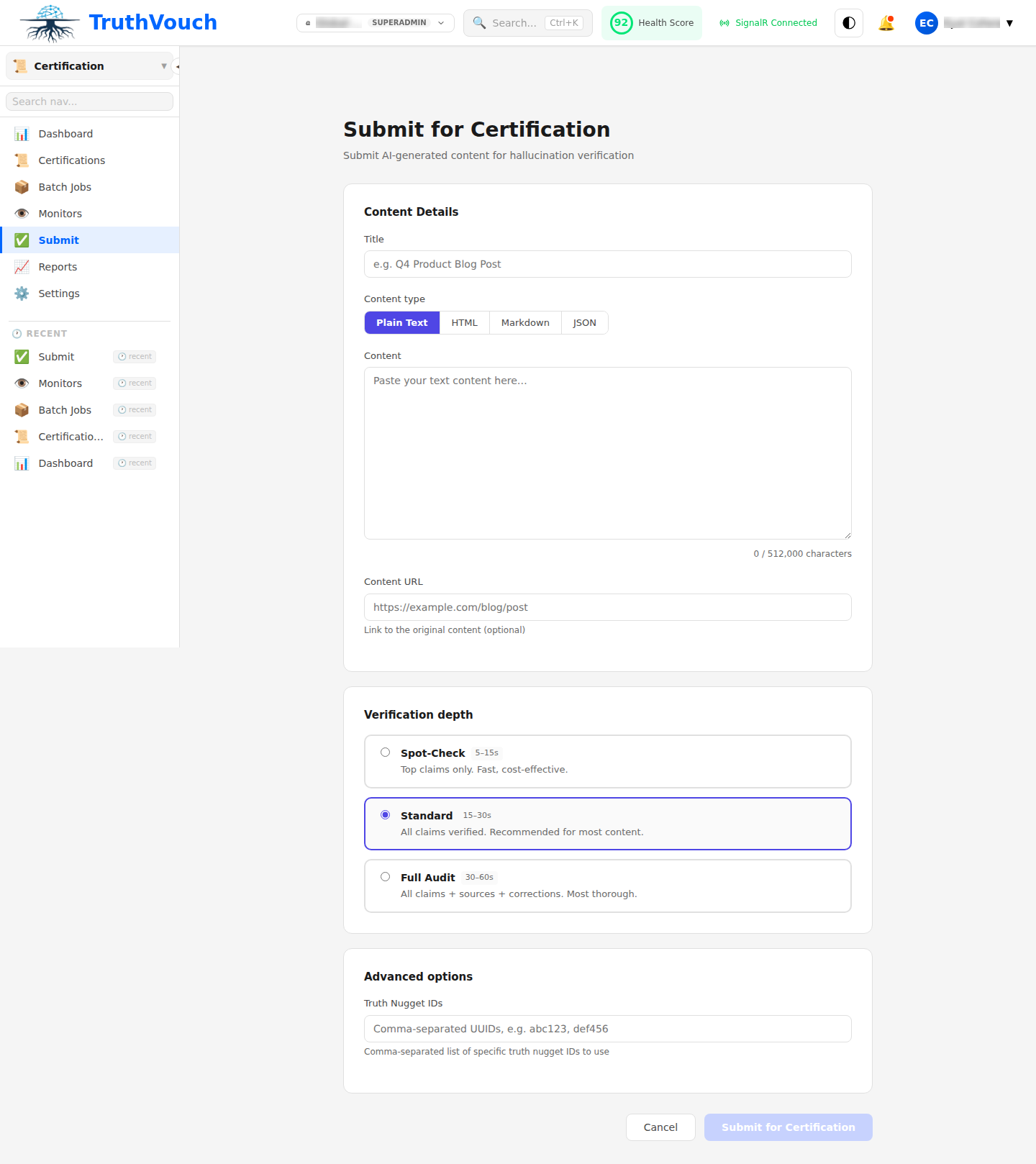
Submission Methods
Dashboard Submission
- Navigate to Certification → Submit Content
- Choose submission method:
- Paste Text: Copy-paste content directly into text editor
- Upload File: Upload PDF, DOCX, HTML, or markdown files
- URL: Provide link to publicly accessible content (auto-fetches text)
- Add metadata:
- Title (optional): Display name for this certificate
- Tags (optional): Categorize by type (marketing, product, legal, etc.)
- Batch ID (optional): Group with other submissions for tracking
- Click Submit for Verification
API Submission
Single Document:
from truthvouch import TruthVouch
client = TruthVouch(api_key="your-api-key")
response = client.certification.submit(    content="Your AI-generated content here...",    content_type="text",    title="Product Guide v2.1",    tags=["product", "marketing"],    batch_id="batch-launch-2024-q1")
print(response.certificate_id)
Multiple Documents (Batch):
documents = [    {        "content": "Content 1",        "title": "Guide A",        "tags": ["product"]    },    {        "content": "Content 2",        "title": "Guide B",        "tags": ["marketing"]    }]
batch = client.certification.batch_submit(    documents=documents,    batch_id="batch-123")
print(f"Batch ID: {batch.id}")print(f"Documents submitted: {batch.document_count}")
Supported Formats
Text Formats
- Plain Text (.txt, .md)
- HTML (.html, .htm) — removes HTML tags, preserves structure
- Markdown (.md) — processes markdown syntax
Document Formats
- PDF (.pdf) — extracts text with optional OCR
- Microsoft Word (.docx) — extracts content, preserves headers
- Google Docs (via URL) — auto-fetches and extracts
Constraints by Format
| Format | Max Size | Processing | Notes |
|---|---|---|---|
| Plain Text | 10 MB | <10s | Fastest option |
| HTML | 5 MB | 10-20s | CSS/JS stripped |
| 5 MB | 20-60s | OCR applied if needed | |
| DOCX | 5 MB | 15-30s | Headers/footers skipped |
| URL | N/A | 20-40s | Must be publicly accessible |
Content Guidelines
What Works Well
- Product Specifications: Detailed features, pricing, compatibility
- Marketing Copy: Claims about company, products, capabilities
- Process Documentation: Standard operating procedures, policies
- Legal Agreements: Terms of service, privacy policies
- Technical Guides: API documentation, configuration guides
What Doesn’t Work Well
- Opinion-Based Content: Personal perspectives, recommendations (not fact-checkable)
- Purely Narrative Text: Stories without verifiable claims
- Image-Only Content: PDFs containing only images without text
- Real-Time Data: Stock prices, weather, live system status (changes too frequently)
Preparation Tips
- Structure Your Content: Use headers, lists, and short paragraphs
- Avoid Hallucinations: Manually review before submission (certification catches but doesn’t prevent)
- Link to Truth: Reference specific truth nuggets in your knowledge base
- Date Your Content: Include publication date for time-sensitive claims
Batch Submission
Batch submission is ideal for certifying multiple documents at once:
Dashboard Batch
- Navigate to Certification → Batch Submit
- Click Add Documents → Select multiple files
- Configure batch settings:
- Auto-Revoke On Change: Automatically revoke if facts change
- Expiry Duration: When certificates expire (30/60/90 days, 1 year)
- Notification Settings: Who gets alerts on completion
- Click Submit Batch
API Batch
import json
# Prepare batch CSVbatch_data = [    {"id": 1, "content": "Document content 1", "type": "product"},    {"id": 2, "content": "Document content 2", "type": "marketing"},]
# Submit batchbatch = client.certification.batch_submit_csv(    data=batch_data,    batch_id="q1-2024-content",    auto_revoke_on_drift=True,    expiry_days=90)
# Poll statuswhile batch.status != "completed":    import time    time.sleep(10)    batch = client.certification.get_batch(batch.id)
# Retrieve resultsresults = client.certification.batch_results(batch.id)for result in results:    print(f"Doc {result.id}: Score {result.trust_score}, Status: {result.status}")
Monitoring Progress
Automatic Status Updates
Dashboard:
- Navigate to Certification → Recent Submissions
- Automatically view submission status and estimated completion time
- Click to preview automatically extracted claims
API:
# Get submission statussubmission = client.certification.get_submission(submission_id)print(f"Status: {submission.status}")print(f"Progress: {submission.processed_claims}/{submission.total_claims}")
# Get batch statusbatch = client.certification.get_batch(batch_id)print(f"Batch Status: {batch.status}")print(f"Completed: {batch.completed_count}/{batch.total_count}")
Handling Errors
If submission fails:
- Unsupported Format: Ensure file is in supported format list
- Size Exceeded: Split large documents into smaller sections
- Encoding Issues: Ensure text is UTF-8 encoded
- No Verifiable Claims: Content may not contain fact-checkable assertions
View detailed error messages in dashboard or via API:
submission = client.certification.get_submission(submission_id)if submission.status == "failed": print(f"Error: {submission.error_message}")Next Steps
- Verification Process: Learn how claims are extracted and verified
- Trust Score: Understand what influences certificate scores
- Monitoring: Set up alerts for certificate changes