Sentinel Configuration
Policy Configuration
Automatically control which AI tools employees can use and what data they can share:
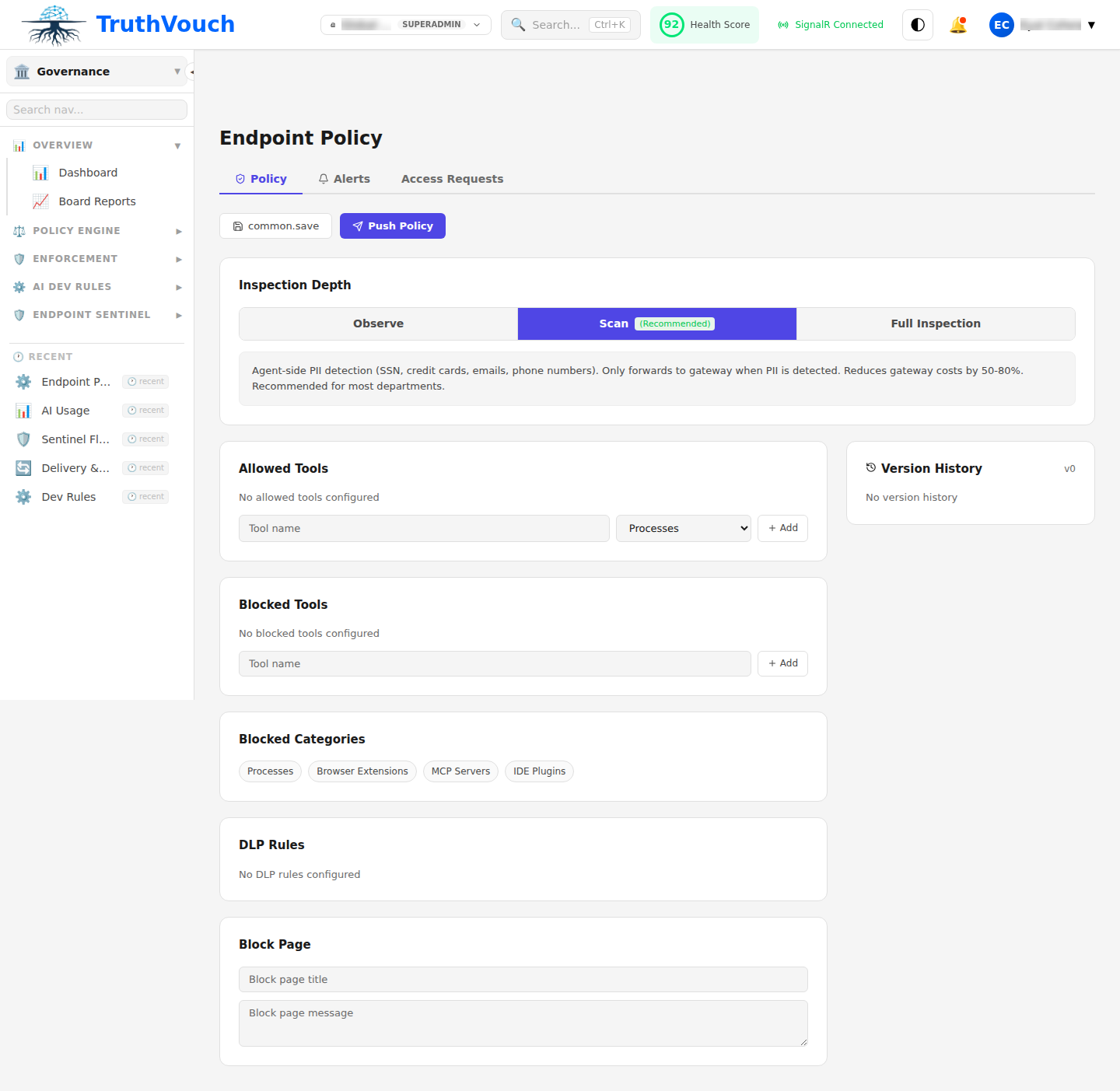
Via UI
- Go to Governance → Sentinel → Policies
- Click + Create Policy
- Name: “Standard Employee Policy”
- Scope: Select which users/departments
- Approved Tools: Check which tools allowed
- Blocked Tools: Check which to block
- DLP Rules: Configure data protection
- Click Deploy to Agents
Via Configuration File
Edit config file on deployed machine:
Windows: C:\Program Files\TruthVouch\sentinel\config.json
macOS: ~/.truthvouch/sentinel/config.json
Linux: /etc/truthvouch/sentinel/config.yaml
policies:  - name: "Standard Employee"    scope:      users: "all"      exclude_groups:        - "IT Department"
    approved_tools:      - chatgpt      - claude      - copilot
    blocked_tools:      - chatgpt_free_tier      - any_unauthorized_llm
    dlp:      enabled: true      block_patterns:        - type: "ssn"          pattern: '\d{3}-\d{2}-\d{4}'        - type: "credit_card"        - type: "api_key"        - type: "password"      action: "block"
    exceptions:      - user: "security_researcher@company.com"        allow: ["any_tool"]
Monitoring Configuration
Control what Sentinel monitors:
monitoring:  # Monitor specific AI tools  tools:    chatgpt: true    claude: true    copilot: true    gemini: true
  # What to capture  capture:    prompts_and_responses: true  # Log interactions    copy_paste: true              # Monitor clipboard    screenshots: false            # Don't capture screenshots    browser_history: true         # Track visited sites    file_access: true             # Monitor file reads
  # Privacy settings  privacy:    encrypt_logs: true    anonymize_user_ids: false    mask_pii_in_logs: false
Reporting Configuration
Configure how Sentinel reports back:
reporting:  # Upload interval  upload_interval_minutes: 60
  # What to report  report:    policy_violations: true    tool_usage: true    dlp_blocks: true    errors_and_warnings: true
  # Compression  compress_logs: true
  # Retry if offline  retry_on_failure: true  max_retries: 5
Device Configuration
Per-device settings:
device:  name: "john-laptop-01"  user_email: "john@company.com"  department: "Engineering"
  # Auto-apply policies for this department  auto_apply_department_policies: true
  # Allow offline operation?  offline_mode:    enabled: true    cache_size_mb: 500    max_hours_offline: 24
  # Auto-update  auto_update: true  auto_update_time: "02:00"  # 2 AM
  # Update frequency  policy_sync_interval_minutes: 30
Logging Configuration
Control logging behavior:
logging:  level: "info"  # debug, info, warn, error
  # Log files  file:    path: "/var/log/truthvouch/"    max_size_mb: 100    max_files: 10    compress_old: true
  # System event log (Windows)  windows_event_log: true
  # Syslog (Linux)  syslog: true
Advanced Settings
Performance Tuning
performance:  # Max CPU usage  max_cpu_percent: 5
  # Max memory  max_memory_mb: 256
  # Batch uploads (faster, uses more bandwidth)  batch_size: 100
  # Queue size before dropping  max_queue_size: 10000
Network Settings
network:  # Proxy settings  proxy:    enabled: false    host: "proxy.company.com"    port: 8080    username: "proxyuser"    password: "proxypass"
  # API endpoint  api_endpoint: "https://api.truthvouch.io"
  # Certificate validation  verify_ssl: true
  # Timeout (seconds)  timeout: 30
Security Settings
security:  # Require password to view logs  password_protect_logs: true
  # Require password to uninstall  password_protect_uninstall: true
  # Prevent disabling  prevent_disable: true
  # Tamper detection  tamper_detection: true  alert_on_tamper: true
Group Policy (Windows)
Deploy standardized config to all machines:
Group Policy Editor (gpedit.msc)
Location:  Computer Configuration > Administrative Templates >  TruthVouch > Sentinel Agent
Available Settings:  - Require password to disable: [X] Enabled  - Policy update interval: 30 minutes  - Report upload interval: 60 minutes  - Block external tools: [X] Enabled
Policy Sync
Policies automatically sync from TruthVouch:
Agent checks every 30 minutes (configurable) ↓Downloads latest policies ↓Applies immediately (no restart needed) ↓Offline cache prevents policy driftTo force immediate sync:
# Windowssentinel-agent --sync-policies
# macOS/Linuxsentinel-agent --sync-policies
Verification
Verify configuration applied:
# WindowsC:\Program Files\TruthVouch\sentinel.exe --verify-config
# macOS/Linuxsentinel-agent --verify-config
Output:
Configuration validation:✓ Config syntax: OK✓ Policies: 3 loaded✓ DLP rules: 12 active✓ Network: Connected✓ Encryption: EnabledStatus: Ready